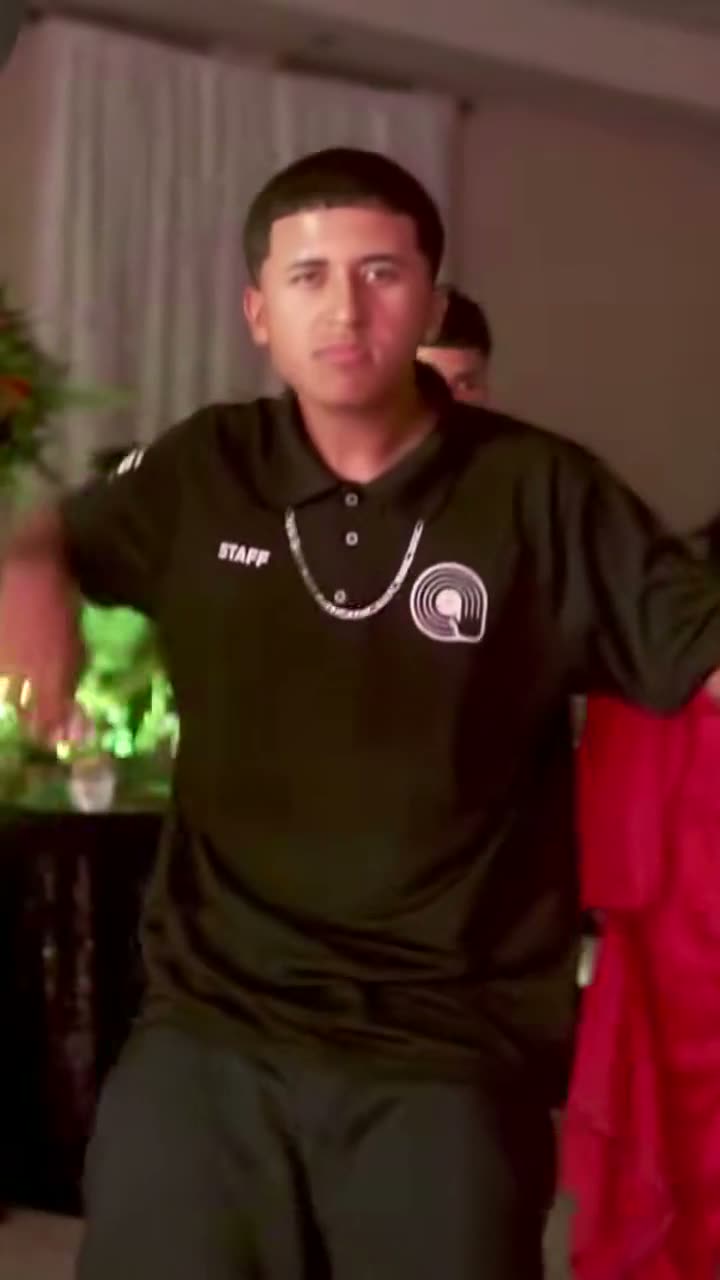
A guy dances up to the camera at a quinceañera, bites a concha, stares into the lens with full cheeks and dances off. Here's how to put yourself in his place from one photo, with no filming, no CapCut template, no green screen and no prompt.
What you're making
The template on our homepage follows the original clip that Eve Ramírez (@eve.el.cholo) posted on 24 July 2025, the one TikTok paired with "BbY WOW" in October 2026. You take his place. New to the meme? Read what the Dime Dime Baby trend is first.
It's one handheld shot at the party, and you get the whole 9 seconds:
| Time | Beat | What you do |
|---|---|---|
| 0–2.5 s | Walk-in | Dance toward the camera from the back of the hall, a concha in your hand |
| 2.5–3.5 s | Bite | Lift the concha right in front of the lens and take a big bite |
| 3.5–5.75 s | Stare | Chew with full cheeks, lips shut, staring straight into the camera |
| 5.75–9 s | Dance away | Turn and dance back into the party, one hand up at the end |
The motion comes from a depth map of the original clip: shapes and camera movement only, no face and no clothes. So the beats land where they do in the meme, and the person you see is the one in your photo. Your face, hair and outfit come from the photo. The concha is kept.
The homepage is for people only. For a dog, cat or other pet, use the pet version.
These are the same three steps as on the homepage.
Step 1: Upload one photo of yourself
One clear, well-lit photo, face sharp and toward the camera, chest up or full body. One person per photo. JPG, PNG or WebP, up to 20 MB.
The stare is a big close-up, so the face matters most. A photo down to the waist or full length also gives the dance more to work with and gets your outfit right. Whatever you wear in the photo is what you wear at the party. Our photo guide has the details.
Use your own photo, or one of an adult who agreed. Photos of celebrities and of children don't pass review.
Step 2: Pick the model and quality
Choose Budget, Balanced or Premium, and 480p or 720p. Premium also offers 1080p. There's only one length: the whole 9-second clip.
The price is shown before you generate. Credits per video:
| Model | 480p | 720p | 1080p |
|---|---|---|---|
| Budget | 4 | 7 | — |
| Balanced | 7 | 15 | — |
| Premium | 15 | 34 | 60 |
Not sure about your photo yet? Try Budget at 480p for 4 credits, then make a sharper version once you like the result. For the close-up stare, Premium is the model we'd pick.
Step 3: Generate and download
Your photo is reviewed first, then the render usually takes a few minutes. You get a vertical 9:16 MP4 with the BbY WOW trend sound and no watermark. Play it on the page, download it, or share it straight to TikTok, Reels or Shorts.
Make your Dime Dime Baby video →
What it costs
The video isn't free, but there's no subscription. Two ways to pay:
- One video, no account. Pay once at checkout and we email you the link when it's ready: $4.99 (Balanced, 480p), $6.99 (Balanced, 720p) or $8.99 (Premium, 480p). All three are the whole 9-second clip.
- One-time credit packs. From $9.90 for 20 credits. Credits never expire. With credits you can pick any model and quality in the table above.
If your photo is rejected or the render fails, your payment or credits come back automatically. See pricing for every pack.
Posting it with the TikTok sound
The trend sound is already in the MP4, lined up from the first frame. That's fine for Reels, Shorts or a group chat.
On TikTok, using the platform's own sound links your post to the trend. To do that:
- On the finished video, turn the music switch off and download the silent MP4.
- Upload it on TikTok, tap Add sound and pick the "BbY WOW" / "dime dime baby" sound.
- Line it up so the bite lands where you want it, add your caption, and switch on the AI-generated label.
The song belongs to its owners. TikTok or Instagram may match it when you post either version. More in the Dime Dime Baby song.
Caption ideas: "Me at every quince when the conchas come out", "POV: you said you weren't hungry", "Nobody touches my concha".
Troubleshooting
My photo was rejected. The review turns down photos with more than one person, no clear face, a celebrity or a child. Your money or credits come back. Try a different photo of yourself.
The face doesn't look like me in the close-up. Use a sharper photo with your face toward the camera and no sunglasses, mask or heavy filter. Premium is the model we'd try next.
My outfit came out wrong. The video can only copy what it sees. A head-and-shoulders photo leaves the rest of the outfit to the model. Use a photo down to the waist or full length.
My hair changed when I turned away. The back of your head isn't in the photo, so it's a guess. A photo with your hair clearly visible, not tucked under a hat, helps.
The render failed. It's refunded automatically. Try again, or try another photo.
Your photos stay private
We never publish your photos or videos, show them to other users, or use them in our examples. Uploads are deleted 30 days after the video is made.
The pet version
On the pet version, one photo of your dog, cat or other pet puts it in his place: it stands on its hind legs, holds the concha in its front paws, bites and stares. Same steps, same prices. The dog and cat guide has the details.
FAQ
Do I need CapCut or a green screen? No. You upload one photo and get the finished video with the sound. Here's how the CapCut template compares.
How long is the video? 9 seconds, the whole clip, in 9:16.
Is there a watermark? No.
Do I have to write a prompt? No. The moves and timing are built in. If you'd like to try a general AI video tool instead, see our Dime Dime Baby prompt.
Which tool is best? We compared the options as of October 2026 in Dime Dime Baby AI video generators.
Make your Dime Dime Baby video →
Dime Dime Baby AI is an independent tool, not affiliated with the man in the clip, KAROL G, Judeline, rusowsky, their labels or CapCut.
Read more
Dime Dime Baby Dog: Make Your Dog or Cat Bite the Concha and Stare With AI
How to make the Dime Dime Baby dog or cat AI video: one pet photo, and it stands on its hind legs, bites the concha and stares into the camera chewing.
Dime Dime Baby CapCut Template and Green Screen: How They Work, and a One-Photo Option
How the Dime Dime Baby CapCut template and green screen work, their limits (face paste, filming, sound, watermark) and a one-photo alternative with the sound.
Dime Dime Baby AI Prompt: Copy-Paste Text for the Concha Bite and Stare
A ready-to-paste Dime Dime Baby AI prompt for Kling, Seedance, Veo or Hailuo: the walk-in, the concha bite, the chewing stare, plus tips and limits.